⊢ FLAGSHIP REVIT DELIVERABLE ENGINE · v2.5 ⊣

Export Pilot - Batch Publish 2D & 3D Revit Deliverables in One Unattended Run.

Eliminate 4+ hours of manual Revit exporting every submittal cycle. Seamlessly publish hundreds of sheets and 3D coordination views simultaneously to PDF, DWG, DWF, DXF, NWC, IFC, and FBX with ISO 19650 dynamic parameter naming, 14-point Navisworks coordinates, and shareable XML studio profiles.

94% Faster Deliverables (4.8 hrs ➔ 42 sec)
100% ISO 19650 Rule Compliance
7 Formats: PDF · DWG · DWF · DXF · NWC · IFC · FBX
Autodesk Revit 2022 – 2026 Ready
⊢ THE VALUE PROPOSITION · MANUAL VS. AUTOMATED ⊣

Why Top BIM Consultancies Replace Native Revit Exporting

Every submittal deadline lost to manual file preparation is pure margin lost. Compare native manual workflows to Export Pilot's automated deliverables engine.

✕ The Manual Native Revit Nightmare

Repetitive Dialogs, Typos & Rejected Submittals

  • ✕
    Fragmented Multi-Dialog Workflow: Engineers click through 15+ separate menus to export PDF, DWG, DXF, and NWC one by one.
  • ✕
    Human Error & Naming Rejections: Manual file renaming results in typos, outdated revision stamps, and rejected CDE submittals.
  • ✕
    Navisworks Coordinate Misalignment: NWC exports accidentally default to Internal coordinates instead of Shared, breaking clash detection.
  • ✕
    Frozen Workstations: Native Revit single-threaded exports lock up the modeler's machine, wasting hours of billable engineering time.
  • ✕
    Zero Team Standardization: Every team member uses different PDF driver settings, layer standards, and unstructured folder outputs.
✔ The Export Pilot Automated Standard

One Unattended Run, 7 Formats & 100% Compliance

  • ✔
    One Unattended Master Batch: Select hundreds of sheets and 3D views once; publish to all 7 formats simultaneously in background threads.
  • ✔
    Mathematical ISO 19650 Naming: Dynamic token formula engine guarantees 100% compliant filenames with instant live previews before export.
  • ✔
    14-Point Navisworks Matrix: Element IDs, room attributes, level division, and Shared Coordinates locked in with zero guesswork.
  • ✔
    94% Production Time Saved: Replaces 4.8 hours of manual babysitting with a 42-second automated pipeline that never crashes.
  • ✔
    Shareable XML Studio Profiles: Save your firm's standards into lightweight XML profiles to standardize export rules across 100+ PCs.
⊢ INTERACTIVE WPF ADD-IN SIMULATOR ⊣

Test Drive the Export Pilot Interface Live in Your Browser

Experience the authentic WPF window directly. Switch between 2D Export and 3D Export, build custom parameter formulas, configure Navisworks settings, and click Preview Naming or Export ALL.

● LIVE REPLICA // AUTODESK REVIT INTEGRATION Interactive engineering sandbox • Real-time formula computation
WPF VIEWPORT · 1024 × 673 PIXELS
Export Pilot
—☐✕
TSE-12-02-PT-0500-PLSA-D-ME-MOD-0100_bimph...WORKSHARED MODEL
bimphase01Revit User
FORMATSETTINGS PROFILES i

OUTPUT DIRECTORY

AFTER EXPORT
Current Profile:Default (Local)
Powered by  BIMPILOTS
2D FILES NAMING RULE i
Group By: iApproved By
Filter By:
TypeNumberSheet NamePDFCADDWFDXF
▾Approver
Sheet000STARTING SHEET----
Sheet012Unnamed----
Sheet013Unnamed----
▾Undefined
View-GROUND FLOOR Copy 1----
View-GROUND FLOOR Copy 1 Copy 1----
View-GROUND FLOOR Copy 1 Copy 1 Copy 1----
View-GROUND FLOOR Copy 1 Copy 1 Copy 1 Copy 1----
View-GROUND FLOOR(1)----
View-Legend 1----
View-Legend 2----
View-Section 1----
3 Sheets · 8 Views
11 PDF · 11 DWG · 11 DWF · 11 DXF
0 3D Views
0 NWC · 0 IFC · 0 FBX
11 Total Items
44 Total Files
⊢ ACTUAL ADD-IN INTERFACE IN AUTODESK REVIT ⊣

Designed for Speed, Clarity & Zero-Error Submittals

Inspect the actual Export Pilot interface inside Autodesk Revit—combining 2D sheet/view publishing and 3D model coordination in one intuitive workspace.

1. 2D Export Workspace (PDF, DWG, DWF, DXF) SHEETS & 2D VIEWS
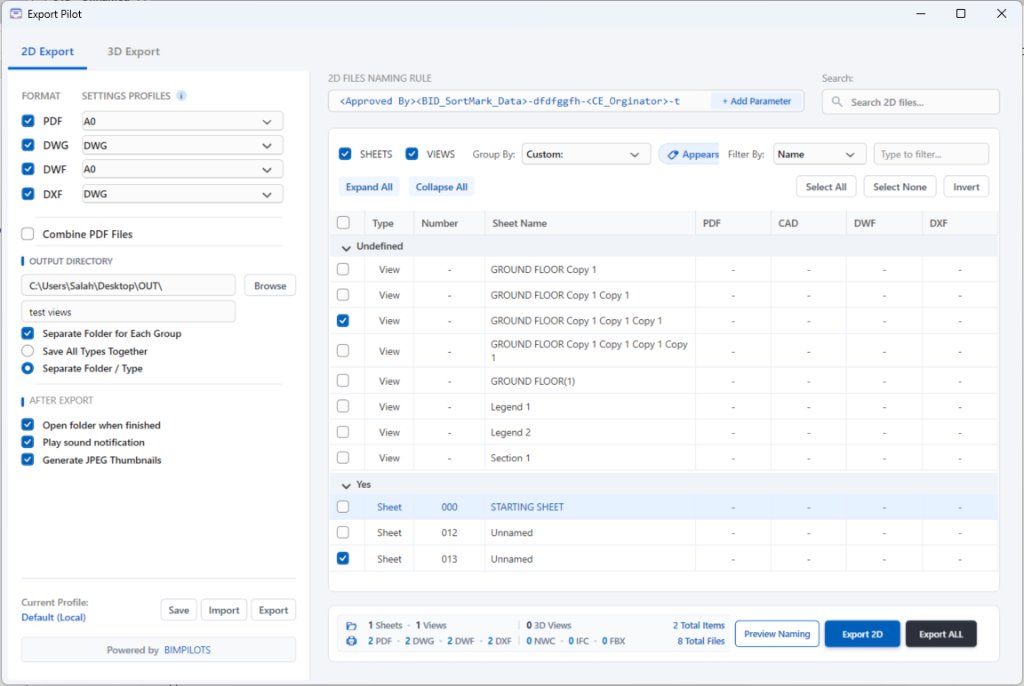
Export Pilot 2D Export Window in Autodesk Revit

Select sheets and 2D views, group by custom project parameters, configure dynamic naming rules, and preview exact output filenames for PDF, CAD, DWF, and DXF side by side.

2. 3D Export Workspace (IFC, FBX, Navisworks NWC) 3D COORDINATION
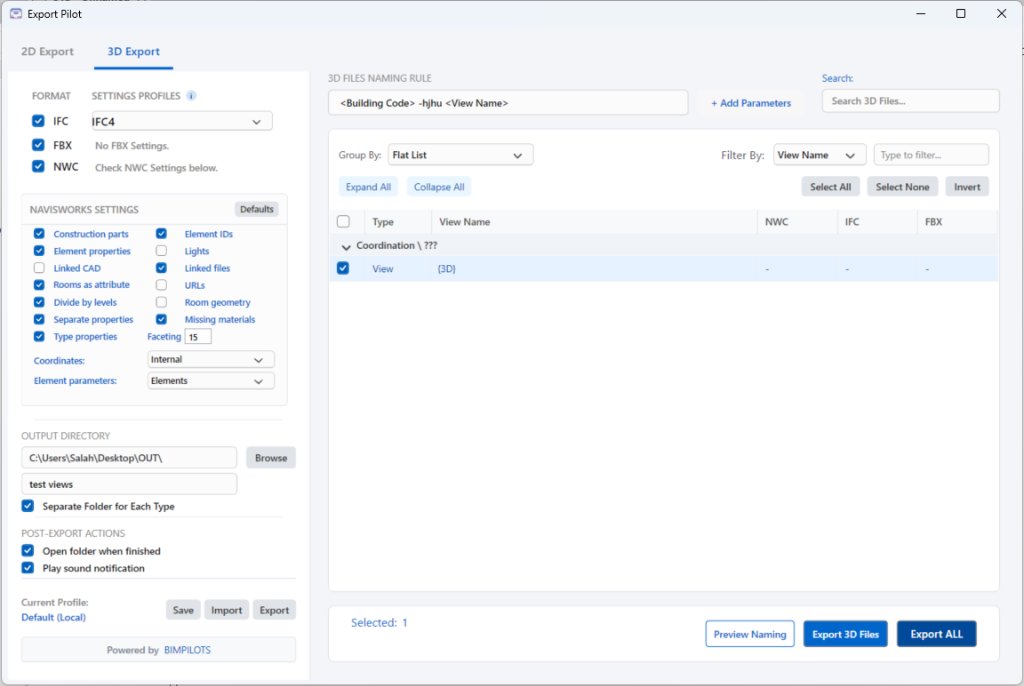
Export Pilot 3D Export Window in Autodesk Revit

Control all 14 Navisworks NWC export flags (Construction parts, Element IDs, Linked files, Divide by levels, Faceting factor, Shared vs. Internal coordinates) directly inside Revit.

⊢ CORE ENGINEERING CAPABILITIES ⊣

Everything Your BIM Team Needs on Deadline Day

Built around ISO 19650 BIM Execution Plans to eliminate manual renaming, wrong coordinate systems, and stalled exports.

01 // ISO 19650 DYNAMIC NAMING ENGINE

Build Multi-Parameter Naming Rules with Live Filename Previews

Combine any built-in Revit parameter or project Shared Parameter into a custom naming formula. Click Preview Naming to verify every generated PDF, DWG, DWF, DXF, NWC, IFC, and FBX filename before writing to disk.

<Project Number> - <Discipline> - <Sheet Number> - <Current Revision>
→ Live Output: PRJ26-ARC-A-101-P03.pdf & PRJ26-ARC-A-101-P03.dwg
02 // MULTI-WORKSTATION LICENSING

One Master Key Across Your Team's PCs

Activate 1, 3, 10, or custom workstation seats with a single key. Release any PC seat remotely from your online Customer Account to move your license in seconds.

WORKSTATION-01 (Revit 2025) ● SEAT 1/3 ACTIVE
LAPTOP-BIM-LEAD (Revit 2025) ● SEAT 2/3 ACTIVE
03 // 14-POINT NAVISWORKS NWC CONTROL

Direct NWC Geometry & Coordinate Matrix

Configure Construction parts, Element IDs, Linked CAD/Revit files, Rooms as attributes, Divide by levels, Faceting factor, and Shared vs. Internal coordinates without opening sub-dialogs.

04 // STUDIO STANDARDIZATION

Shareable XML Profiles & Smart Folder Routing

Save your entire export setup into a lightweight `.xml` profile file. Automatically organize deliverables into separate folders by Group or by File Type (`PDF/`, `DWG/`, `NWC/`, `IFC/`), and optionally generate JPEG sheet thumbnails.

⊢ THE EXPORT PILOT PIPELINE ⊣

The Complete Automation Lifecycle in Action

Watch how Export Pilot hooks directly into your Revit project geometry, compiles dynamic parameter rules, and extracts verified deliverables with 94% time savings.

STAGE 05 // ROI & IMPACT TELEMETRY
X: 925.6
Y: 434.8
Photorealistic 3D Architectural Model
GLAZED FACADE • LEVEL 14
// CENTRAL REVIT MODEL (850 MB) 14,820 SPATIAL ELEMENTS COORDINATION: ARCH + STRUCT + MEP READY FOR AUTOMATION HOOK
TERMINAL // C# .NET 8 • REVIT API BATCH PIPELINE ● STREAMING CONTINUOUSLY
// 1. Initialize Direct Revit Document Hook
using Autodesk.Revit.DB;
using Autodesk.Revit.UI;
namespace Bimpilots.Engine.Automation
{
[Transaction(TransactionMode.Manual)]
public class BatchProcessor : IExternalCommand
{
public Result Execute(ExternalCommandData cmd, ref string msg)
{
Document doc = cmd.Application.ActiveUIDocument.Document;
var sheets = new FilteredElementCollector(doc)
.OfClass(typeof(ViewSheet))
.WherePasses(new ISO19650Filter());
// High-Speed Multithreaded Deliverables Assembly
Parallel.ForEach(sheets, sheet => {
ExportDeliverable(sheet, "PDF/DWG/NWC/IFC");
});
return Result.Succeeded;
}
}
}
// 1. Initialize Direct Revit Document Hook
using Autodesk.Revit.DB;
using Autodesk.Revit.UI;
namespace Bimpilots.Engine.Automation
{
[Transaction(TransactionMode.Manual)]
public class BatchProcessor : IExternalCommand
{
public Result Execute(ExternalCommandData cmd, ref string msg)
{
Document doc = cmd.Application.ActiveUIDocument.Document;
var sheets = new FilteredElementCollector(doc)
.OfClass(typeof(ViewSheet))
.WherePasses(new ISO19650Filter());
// High-Speed Multithreaded Deliverables Assembly
Parallel.ForEach(sheets, sheet => {
ExportDeliverable(sheet, "PDF/DWG/NWC/IFC");
});
return Result.Succeeded;
}
}
}
100%
> Compiling Bimpilots.Engine.dll (.NET 8.0)...
> Optimizing MSIL Native Memory Hooks... OK
> Binding Autodesk Revit 2022–2026 API... OK
✔ BUILD SUCCEEDED: 0 ERRORS • COMPILED BINARY READY
BP Export Pilot v2.5
● COMPILED ADD-IN DEPLOYED
Hybrid 2D & 3D Deliverables Engine
Full Revit Ribbon integration with mathematical ISO 19650 parameter naming & Navisworks coordinates.
PDF ✓ VECTOR A0
DWG ✓ ACAD 2024
DWF ✓ DWFx MARKUP
DXF ✓ CAD 2D/3D
NWC ✓ 14-POINT
IFC ✓ IFC4 CERT
FBX ✓ 3D MESH
Ready to run in Autodesk Revit 2022–2026
Requires BIMPILOTS account sign-in
⏱ TIME SAVED PER PROJECT
94 % Faster
4.8 Hours Manual ➔ 42 Seconds
🎯 HUMAN ERROR RATE
0.02 % Errors
100% ISO 19650 Rule Compliance
🔄 REPETITIVE CLICKS ELIMINATED
1,448 + Clicks
Per Week Per Workstation Seat
💰 PROJECT COST REDUCTION
$18,456 Saved
Recovered Annual Engineering Hours
RESULT: VERIFIED PRODUCTION ACCELERATION
View Commercial Seat Plans →
⊢ TRANSPARENT MULTI-WORKSTATION LICENSING ⊣

All Plans Include 100% Full Add-In Features

No feature paywalls. Every license includes all 7 formats, ISO 19650 dynamic naming rules, 14-point Navisworks matrix, Revit 2022–2026 support, and self-service PC seat transfers.

Solo Engineer
1 Workstation PC
EGP 4,990 / year
  • 1 Workstation PC per License Key
  • All 7 Formats (PDF, DWG, DWF, DXF, NWC, IFC, FBX)
  • ISO 19650 Parameter Formula Builder & Previews
  • Full 14-Point Navisworks Coordinates & Geometry
  • Shareable XML Studio Export Profiles
  • Full Revit 2022, 2023, 2024, 2025 & 2026 Support
  • Self-Service PC Seat Transfer Portal
Purchase Solo Key (1 PC) →
Enterprise Fleet
10 Workstation PCs
EGP 25,990 / year
  • Up to 10 Workstation PCs on 1 Master Key
  • All 7 Formats (PDF, DWG, DWF, DXF, NWC, IFC, FBX)
  • ISO 19650 Parameter Formula Builder & Previews
  • Full 14-Point Navisworks Coordinates & Geometry
  • Shareable XML Studio Export Profiles
  • Full Revit 2022, 2023, 2024, 2025 & 2026 Support
  • Silent IT `.EXE` Group Policy Deployment Ready
Purchase Fleet Key (10 PCs) →
Custom Enterprise
Custom PC Seats (15 to 500+)
Custom Order
Tailored Seat Count or Office Site License
  • Custom Workstation Seat Allocation (15–500+ PCs)
  • All 7 Formats (PDF, DWG, DWF, DXF, NWC, IFC, FBX)
  • ISO 19650 Parameter Formula Builder & Previews
  • Full 14-Point Navisworks Coordinates & Geometry
  • Bespoke CDE / Naming Integrations
  • Corporate Invoice / PO Billing Support
  • Dedicated Solutions Architect & SLA
Request Custom Enterprise Order →
14-DAY FREE TRIAL REVIT 2022–2026 · .EXE INSTALLER

Want to test Export Pilot on your Revit project first?

Download the full-featured 14-day trial installer. Sign in to your BIMPILOTS account to unlock your trial key and download the package.

Requires BIMPILOTS account sign-in
Supported Payment Channels: Visa / Mastercard PayPal International InstaPay (Egypt) Vodafone Cash / Paymob
⊢ TECHNICAL SPECIFICATIONS & FAQ ⊣

Frequently Asked Questions

Everything your BIM management, engineering, and IT departments need to know before deploying Export Pilot.

Which Autodesk Revit versions are supported?
Export Pilot natively supports Autodesk Revit 2022, 2023, 2024, 2025, and 2026. One single `.exe` installer deploys the plugin across all installed versions on your machine.
How does workstation seat licensing work?
Your license key allows activation on your designated number of concurrent PCs (e.g., 1 PC, 3 PCs, or 10 PCs). If an engineer upgrades or replaces their laptop, you can release the seat anytime with 1 click from your My Account portal.
Does Export Pilot support custom Shared Parameters?
Yes. The ISO 19650 dynamic naming builder detects all native Revit project parameters as well as firm-specific Shared Parameters (e.g. <Originator>, <Zone>, <Level>, <Discipline>) for complete BEP compliance.
Can our IT team deploy Export Pilot silently?
Yes. The installation package is a standard Windows Setup (`.exe`) that supports silent command-line deployment via ExportPilot_Setup.exe /VERYSILENT /SUPPRESSMSGBOXES /NORESTART through Microsoft Intune, Group Policy (GPO), or SCCM.