Every submittal deadline lost to manual file preparation is pure margin lost. Compare native manual workflows to Export Pilot's automated deliverables engine.
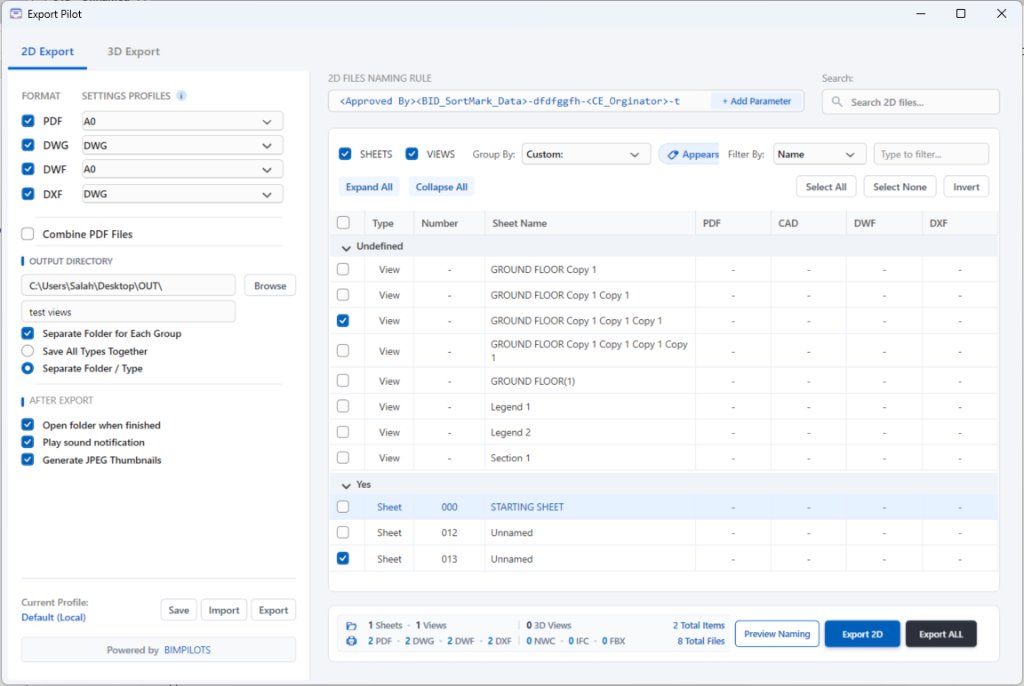
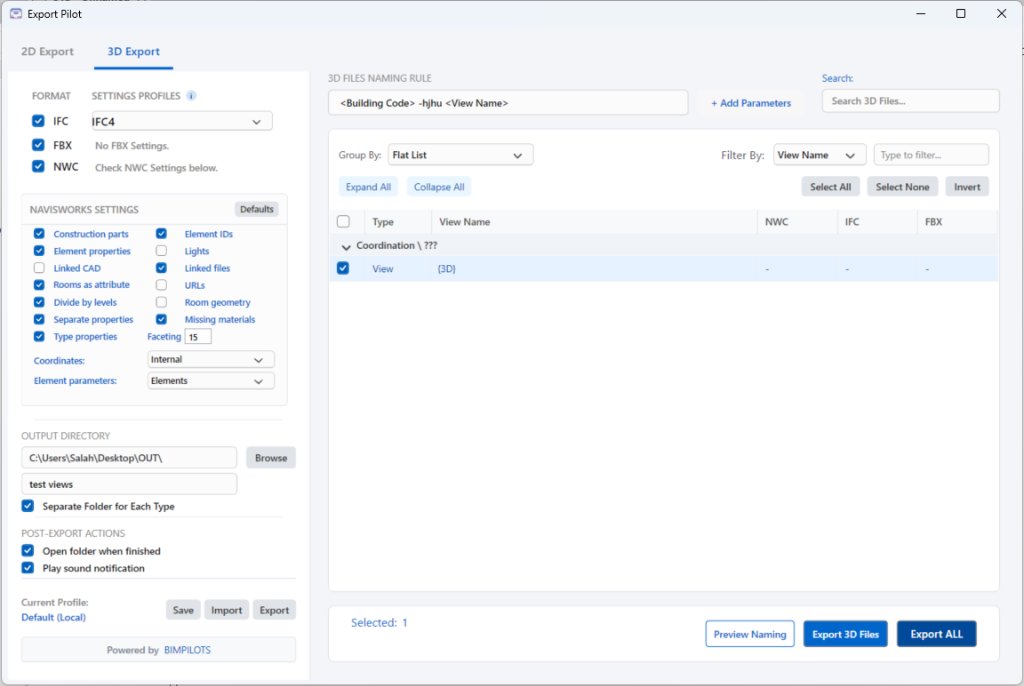
Experience the authentic WPF window directly. Switch between 2D Export and 3D Export, build custom parameter formulas, configure Navisworks settings, and click Preview Naming or Export ALL.
| Type | Number | Sheet Name | CAD | DWF | DXF | ||
|---|---|---|---|---|---|---|---|
| ▾Approver | |||||||
| Sheet | 000 | STARTING SHEET | - | - | - | - | |
| Sheet | 012 | Unnamed | - | - | - | - | |
| Sheet | 013 | Unnamed | - | - | - | - | |
| ▾Undefined | |||||||
| View | - | GROUND FLOOR Copy 1 | - | - | - | - | |
| View | - | GROUND FLOOR Copy 1 Copy 1 | - | - | - | - | |
| View | - | GROUND FLOOR Copy 1 Copy 1 Copy 1 | - | - | - | - | |
| View | - | GROUND FLOOR Copy 1 Copy 1 Copy 1 Copy 1 | - | - | - | - | |
| View | - | GROUND FLOOR(1) | - | - | - | - | |
| View | - | Legend 1 | - | - | - | - | |
| View | - | Legend 2 | - | - | - | - | |
| View | - | Section 1 | - | - | - | - | |
Inspect the actual Export Pilot interface inside Autodesk Revit—combining 2D sheet/view publishing and 3D model coordination in one intuitive workspace.
Select sheets and 2D views, group by custom project parameters, configure dynamic naming rules, and preview exact output filenames for PDF, CAD, DWF, and DXF side by side.
Control all 14 Navisworks NWC export flags (Construction parts, Element IDs, Linked files, Divide by levels, Faceting factor, Shared vs. Internal coordinates) directly inside Revit.

Built around ISO 19650 BIM Execution Plans to eliminate manual renaming, wrong coordinate systems, and stalled exports.
Combine any built-in Revit parameter or project Shared Parameter into a custom naming formula. Click Preview Naming to verify every generated PDF, DWG, DWF, DXF, NWC, IFC, and FBX filename before writing to disk.
Activate 1, 3, 10, or custom workstation seats with a single key. Release any PC seat remotely from your online Customer Account to move your license in seconds.
Configure Construction parts, Element IDs, Linked CAD/Revit files, Rooms as attributes, Divide by levels, Faceting factor, and Shared vs. Internal coordinates without opening sub-dialogs.
Save your entire export setup into a lightweight `.xml` profile file. Automatically organize deliverables into separate folders by Group or by File Type (`PDF/`, `DWG/`, `NWC/`, `IFC/`), and optionally generate JPEG sheet thumbnails.
Watch how Export Pilot hooks directly into your Revit project geometry, compiles dynamic parameter rules, and extracts verified deliverables with 94% time savings.
No feature paywalls. Every license includes all 7 formats, ISO 19650 dynamic naming rules, 14-point Navisworks matrix, Revit 2022–2026 support, and self-service PC seat transfers.
Download the full-featured 14-day trial installer. Sign in to your BIMPILOTS account to unlock your trial key and download the package.
Everything your BIM management, engineering, and IT departments need to know before deploying Export Pilot.
<Originator>, <Zone>, <Level>, <Discipline>) for complete BEP compliance.
ExportPilot_Setup.exe /VERYSILENT /SUPPRESSMSGBOXES /NORESTART through Microsoft Intune, Group Policy (GPO), or SCCM.